TOTAL BATTLE GUIDE
How to find an active exchange in Total Battle
Use Mercenary Radar to search recently verified exchange locations across Total Battle kingdoms and reveal the K, X and Y coordinates you need.
Step-by-step exchange search
- Open the live Total Battle exchange finder.
- Enter the first and last kingdom in the K range fields.
- Apply the filter and review the detected exchanges.
- Sign in to reveal the kingdom and full X and Y coordinates.
- On Windows, use the companion app to open the selected position in the PC game.
Check how recent a result is
Exchanges are temporary map objects. Each result includes information about its latest confirmation. A recent confirmation gives a better indication of the current position, although the game state can change between a scan and the moment you open the map.
Understanding K, X and Y
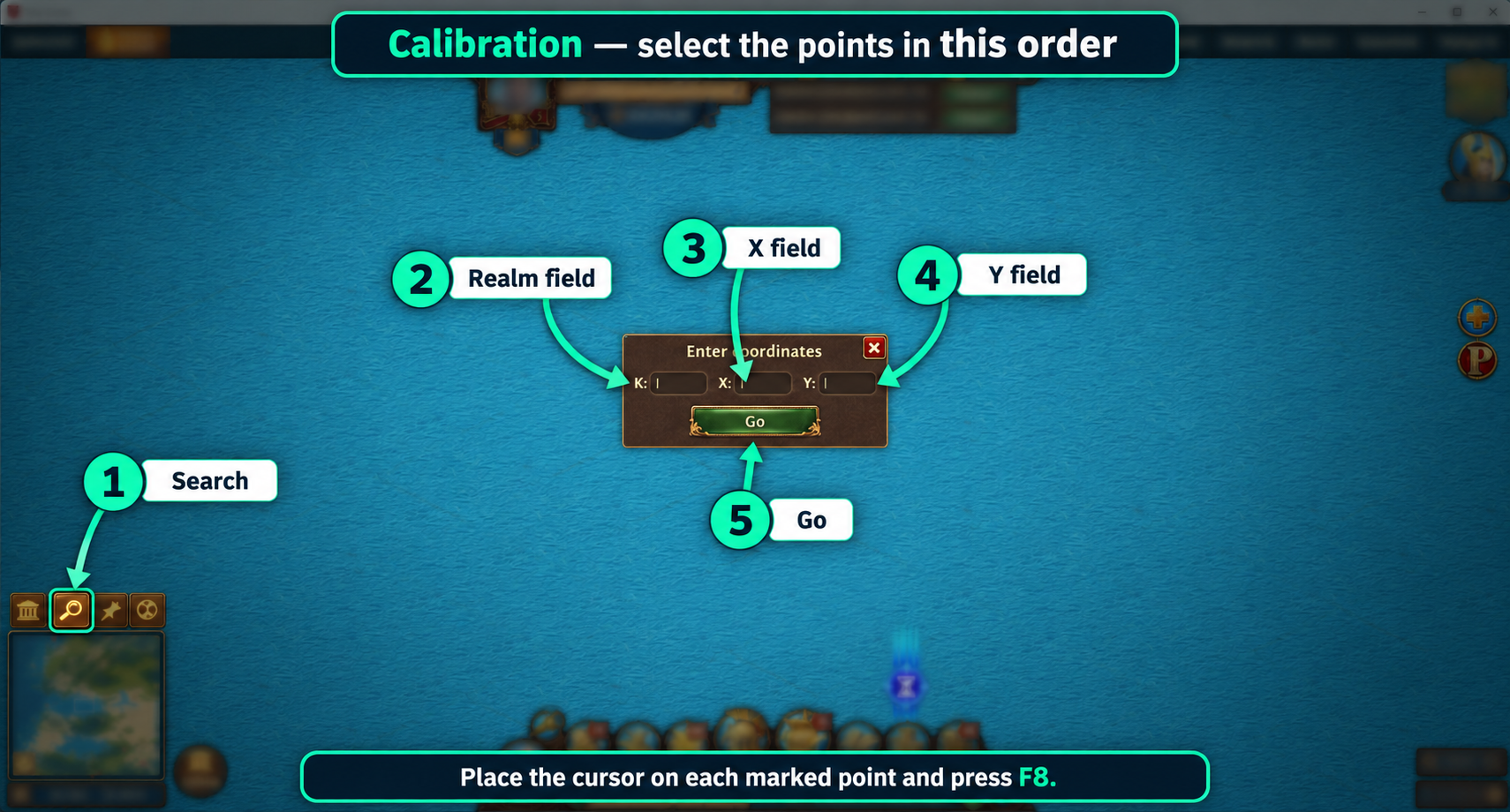
K identifies the kingdom. X and Y identify the location within that kingdom. All three values are required to navigate to an exchange. The Windows app can enter these values after a short one-time calibration.
Search by kingdom
A kingdom range narrows the live exchange list to the area you want to inspect. This is useful when searching for fresh Mercenary Exchange coordinates close to your home kingdom.
Using Mercenary Radar on a phone
On a phone, use the same exchange finder and account. After revealing a location, enter K, X and Y in the game. Automatic transfer to the game is available only in the Windows app.
Search active exchangesMercenary Radar for Windows
The app uses the same account and credit balance as the website. After revealing an exchange, it can activate the Total Battle window and enter K, X and Y in the fields you calibrated earlier.
Requirements
- Total Battle installed and running on the computer.
- Windows 10 or Windows 11.
- An internet connection and a Mercenary Radar account.
The app does not support the mobile or browser version of Total Battle.
Calibration
On first launch, indicate the magnifying glass, the K, X and Y fields, and the move button. The preview lets you check the setup before use.